

 Loading...





Introduction to My First 100 Words
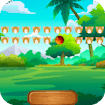
In My First 100 Words, a spoken prompt asks for a word and you pick the matching emoji from a row of options. It covers English, Spanish, French and Norwegian, with audio pronunciation for every item.
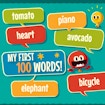
My First 100 Words is built with HTML5 technology and runs as a browser game on desktop and mobile, with no download required.
Key Features of My First 100 Words
- Four languages supported: English, Spanish, French and Norwegian
- Nearly 200 useful words per language, with new ones added regularly
- Audio clips giving the correct pronunciation of every word
- 31 levels that increase in challenge as you progress
- Emoji-based prompts, so no reading ability is required to start
- Free educational game that runs in the browser with no download
What is My First 100 Words?
My First 100 Words is a free online educational game for building early vocabulary in one of four languages. The format is deliberately simple: an emoji represents a word, the written form is displayed, and an audio clip provides the correct pronunciation. You are then asked verbally to identify a specific item from a row of emojis. The loop is listen, recognise, select. What differentiates My First 100 Words from a flashcard app is the listening-first design, since the prompt is spoken rather than written. That makes it usable by children who cannot yet read, and it also trains adults toward comprehension rather than translation.
How to Play My First 100 Words
On desktop, use your mouse to select the emojis in the right order. On mobile, use your touchscreen to do the same. Each round asks you verbally to identify a specific vocabulary item from a list of emojis, and selecting the correct one advances you. There is no fail state and no timer, so a wrong answer costs nothing but another attempt. There are 31 levels and My First 100 Words becomes more challenging over time, with nearly 200 useful words available per language and new ones added frequently.
| Input | Action |
|---|---|
| Mouse click (desktop) | Select an emoji |
| Touch (mobile) | Select an emoji |
| Language setting | English, Spanish, French or Norwegian |
| Audio clip | Correct pronunciation of the current word |
Core My First 100 Words Gameplay Mechanics
Listening before reading. When the prompt plays, resist looking at the written word first. Matching sound to image directly is what builds comprehension, whereas reading first turns the exercise into decoding rather than listening.
Repetition without penalty. When an answer is wrong, nothing is lost. Replaying the audio and trying again is the intended behaviour, and this absence of punishment is what makes My First 100 Words suitable for very young learners.
Level escalation. When you progress through the 31 levels, the choices get harder rather than the rules changing. Expect more similar-looking options and less obvious distinctions between them as you advance.
Language switching. When a language becomes comfortable, switch to another. The same emoji set across four languages means the visual vocabulary carries over, so only the sound and spelling are new.
My First 100 Words Strategies That Work
Say the word aloud. Repeat each pronunciation clip out loud before selecting. Speaking engages a different memory pathway from listening alone, and for early vocabulary that combination is considerably more durable than passive recognition.
Do short daily sessions. Ten minutes a day beats an hour once a week for vocabulary retention. Because there is no timer and no score to defend, My First 100 Words fits naturally into a short routine, which is where its real value sits.
Replay the audio deliberately. Listening twice before answering costs nothing and improves accuracy substantially. For a child, that second listen is often the difference between a guess and genuine recognition of the word.
Cover the written word. If you are learning rather than testing, look away from the text on the first pass. Sound-to-meaning is the harder and more useful skill, and the written form is available afterwards to confirm.
Use one language at a time. Switching languages mid-session creates interference, particularly between Spanish and French. Finishing a session in one language before changing keeps the vocabulary distinct rather than blended together.
Return to earlier levels. Revisiting completed levels is not wasted time, because vocabulary fades without review. A quick pass through familiar words before starting a new level is what makes the new material stick.
Games Similar to My First 100 Words
| Game | Why try it |
|---|---|
| Kobadoo Shapes | The same Kobadoo-style recall format applied to shapes. |
| Robot Band - Find the differences | Gentle observation puzzles with no time pressure. |
| Twin Peeks | Spot-the-difference scenes suitable for all ages. |
| Royal Couple Halloween Party | Creative dressing with no failure state at all. |
| Lotl Spa | Relaxed idle play for a calm family session. |
FAQ About My First 100 Words
Is My First 100 Words free? Yes. My First 100 Words runs in the browser at no cost, with no account and no installer. Free educational titles distributed this way normally carry sponsor or ad placements around the frame, which is worth knowing if a child is playing unsupervised.
Which languages are supported? English, Spanish, French and Norwegian. Each has nearly 200 useful words available, and My First 100 Words states that new words are added frequently, so the vocabulary set is not fixed at its current size.
How many levels are there? 31 levels, and My First 100 Words becomes more challenging as you move through them. The rules do not change, so the escalation comes from harder distinctions between the emoji options rather than new mechanics.
Is it suitable for young children? Yes. Prompts are spoken rather than written, the input is a single tap, and there is no fail state or timer. Those three design choices together make it usable well before a child can read.
Can adults use it to learn a language? It targets essential everyday vocabulary rather than grammar, so it works as a beginner listening and recognition tool. For anything beyond core nouns and basic pronunciation you will need a fuller course alongside it.
Does it work on a phone or tablet? Yes. Touch selection replaces the mouse and nothing else changes. A tablet is arguably the best format, since the emoji targets are large and the audio matters more than screen precision.
My First 100 Words Technical Details
My First 100 Words is an HTML5 browser game that runs in current versions of Chrome, Firefox, Edge and Safari with no plugins, and there is no download and no installation. Input is a single mouse click or screen tap, so no keyboard is needed. Audio playback is required for the pronunciation clips, so sound should be enabled. The presentation is light, which means fast loading and reliable performance on older tablets and low-end laptops.
Final Verdict on My First 100 Words
My First 100 Words is a genuinely useful little tool disguised as a game: four languages, spoken prompts, no failure state and 31 levels of gradually harder recognition. It is well suited to young children and to adults starting a language from zero. Its limits are scope, since it teaches vocabulary and pronunciation rather than grammar or sentences. As a free browser game with no download, it is easy to recommend.